
Works even with no internet
Welcome to the Restaurant OS
Restaurant POS system: orders, kitchen, payments, inventory and sales in one place. Even with no internet.


Chapter 1
It all starts with an order.
Three taps on the POS. The check adds itself up.
Chapter 2
The kitchen springs into action.
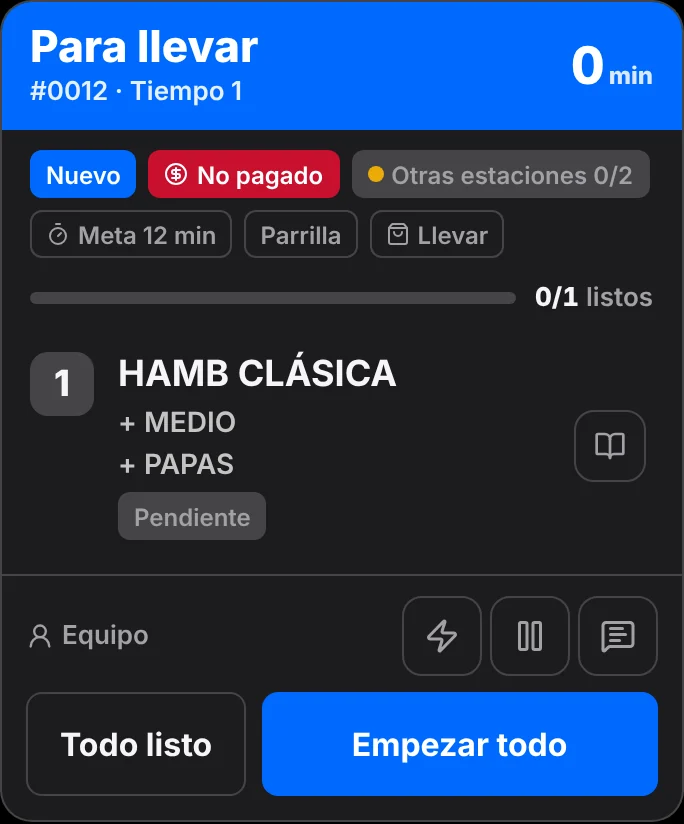
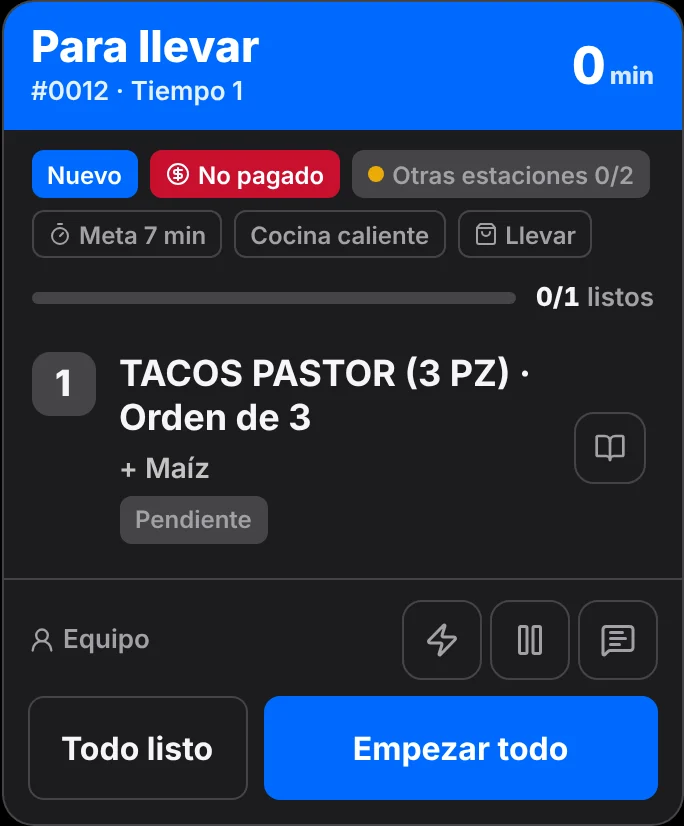
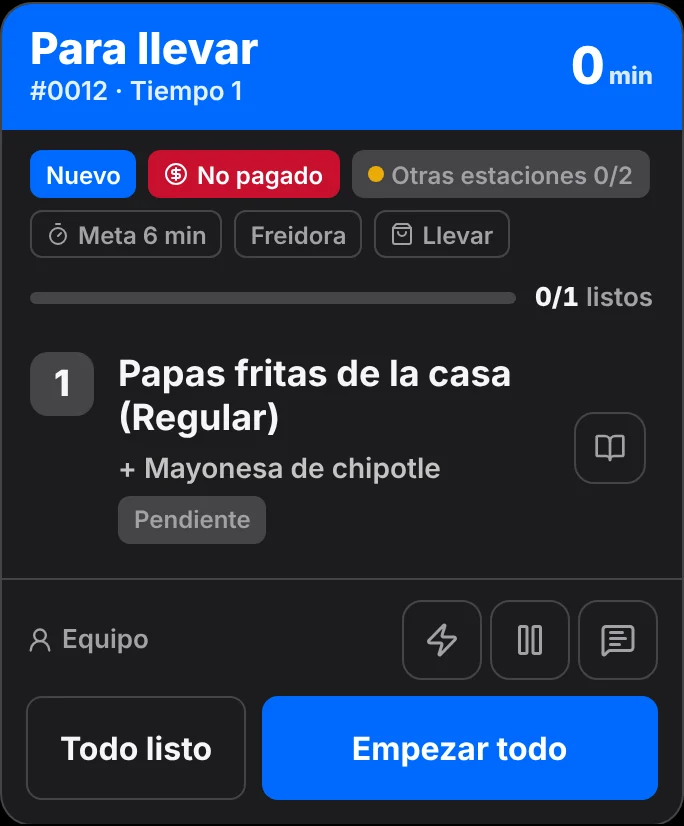
Order #0012 splits itself: each dish reaches its station with its own time goal.
Your restaurant. Fully under control.
Everything you need to sell, run and grow. Even offline.
Real Fudinow screens · illustrative walkthrough
It all starts with an order.
Three taps on the POS: a classic burger cooked medium, fries with chipotle mayo and tacos al pastor. The check adds itself up.
- 1Classic burger · $12.90
- 2House fries · $4.50
- 3Tacos al pastor · $8.90
- →Send 3 to kitchen
The kitchen springs into action.
Order #0012 splits itself: each dish reaches its station with its own time goal.
GrillGoal 12 min Hot lineGoal 7 min FryerGoal 6 min
StripeMercado PagoUber EatsPedidosYaDeliverectFacturamaThe Factory HKAFactusNubefactOpenFacturaBrevoStripeMercado PagoUber EatsPedidosYaDeliverectFacturamaThe Factory HKAFactusNubefactOpenFacturaBrevo
One register for every way you sell
- Dine in
- Takeout
- Your own delivery
- Bar tabs
- Online store
- QR ordering at the table
- Kiosk
Designed for
- Casual dining
- Café
- Quick service
- Pizzeria
- Bar
- Fine dining
- Food truck
- Bakery
A day with Fudinow
From the first order to the cash close.
Every part of the shift works on the same data: what is sold in the dining room reaches the kitchen, gets paid at the register and shows up in your reports.
Service
Take orders in seconds, in the dining room or online.
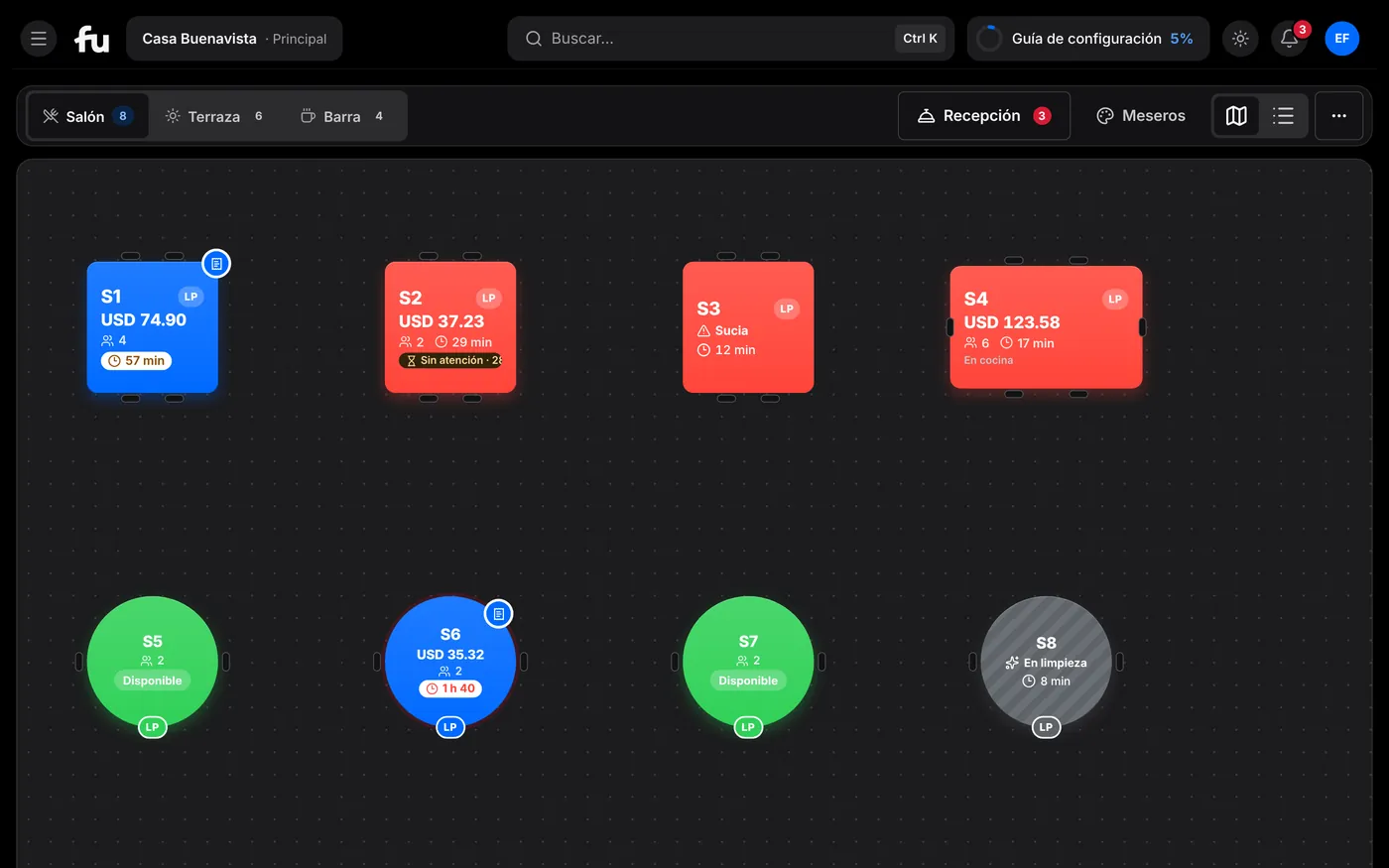
Products with photos, modifiers and combos one tap away. The floor plan shows which table is free, occupied or asked for the check.
- Dine in, takeout, delivery and bar tabs
- Courses and seats to serve every dish in order
- Online store, QR ordering from the table and kiosk
- Reservations and waitlist next to the floor plan
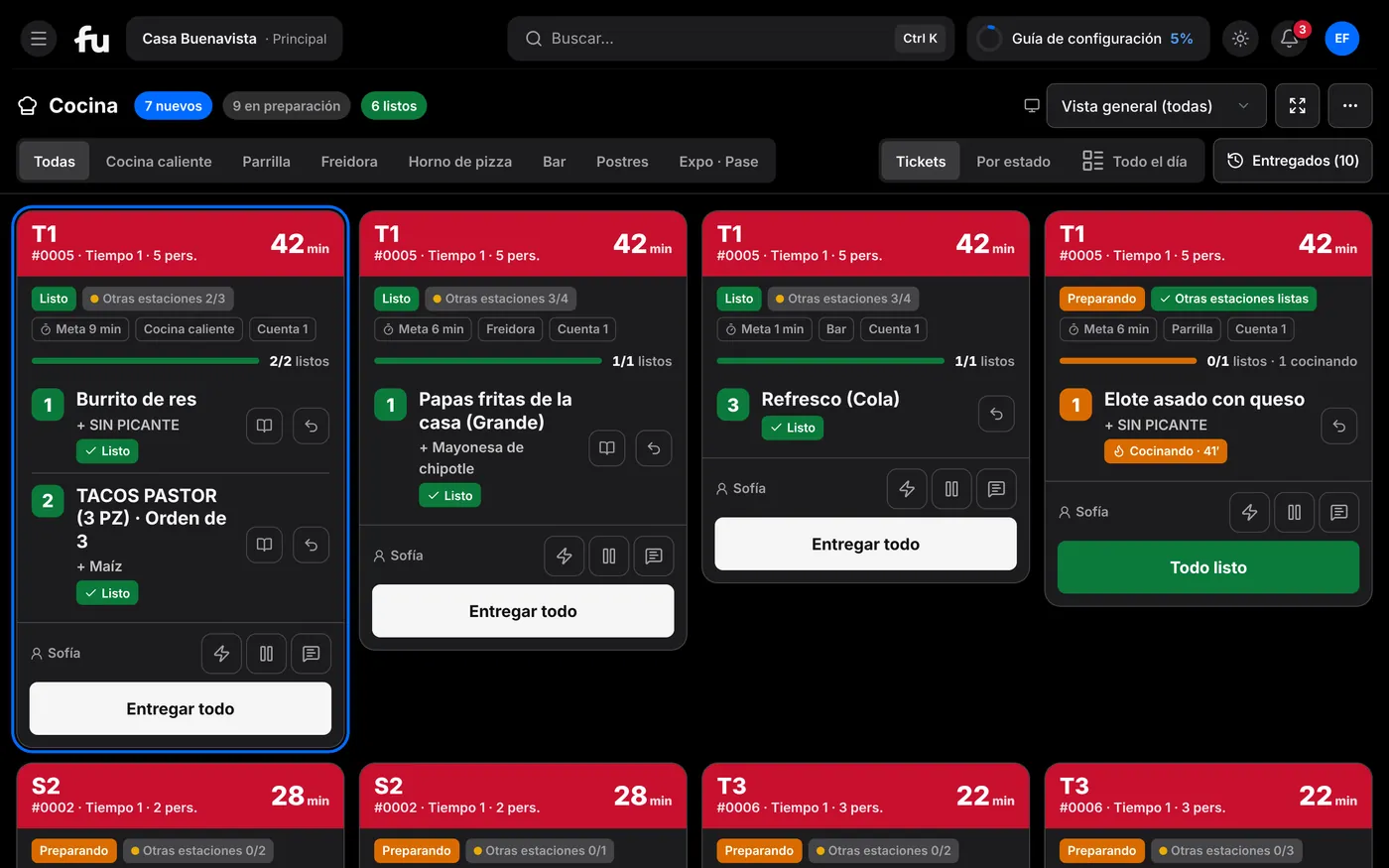
Kitchen
The kitchen sees every order as soon as it is sent.
Kitchen display (KDS) by station, with timers and an expo pass that confirms every order leaves complete.
- Stations: grill, fryer, bar, desserts and any you need
- A time goal per dish and colors when a ticket runs late
- Menu with modifiers, combos and allergens
Checkout
Take payment however guests ask, and stay balanced.
Split the check by seat or in parts, add tips and record every payment. At the end of the shift, close the drawer with X and Z reports.
- Split and merge checks, by seat or in equal parts
- Cash in local or foreign currency, at the exchange rate you set
- Cards charged on your own terminal and recorded in Fudinow
- Offline you keep taking cash; everything syncs when you reconnect
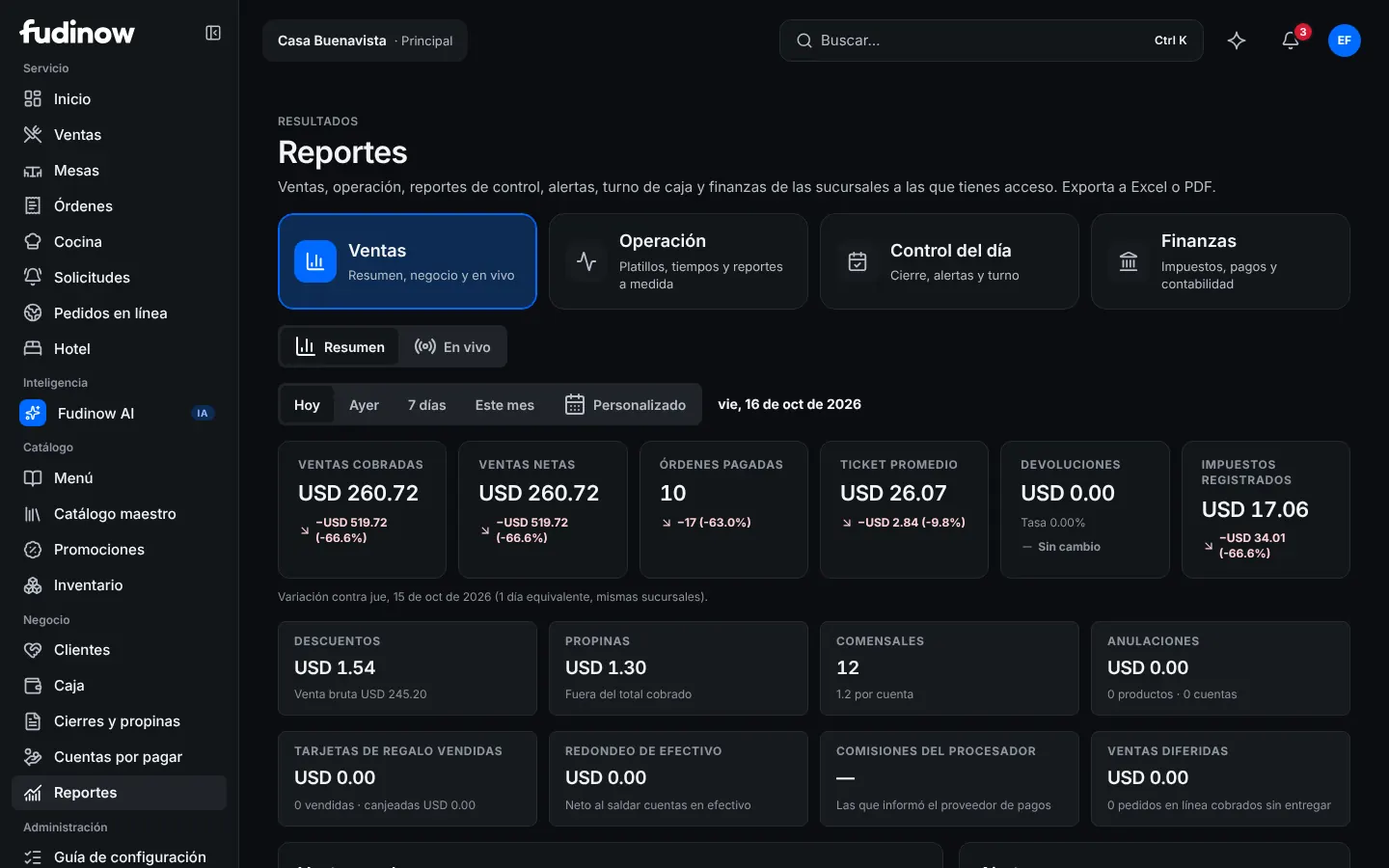
Management
Close the day with clear numbers.
Sales by hour, product, channel and server, compared with the previous period. Inventory, team and customers, all in the same place.
- Inventory with recipes, costing, suppliers and purchase orders
- Customers with points, tiers and gift cards
- Team with roles, PIN, time clock, schedules and tips
- Reports you can export to Excel or PDF, per location or combined


Sell online through your own channels
Your restaurant, open on your customers' phones too.
Web store, table QR, kiosk and your own delivery: every order reaches the same kitchen and the same register, with nothing copied by hand.
Your own web store
Your own page with your brand and your domain. Customers order pickup or delivery, create an account and reorder in one tap.
QR on every table
Guests scan, browse the menu with photos and order from their phone. The order goes straight to the kitchen.
Self-service kiosk
A screen where guests build their own order without waiting in line, ideal for counters and quick service.
Your own delivery
Set zones and delivery fees, dispatch your drivers and follow every order to the door.
No third-party commissions on your direct orders.
How an online order arrives
From your customer’s phone to their door, with nothing copied by hand.
The order goes straight to the register and the kitchen, the payment is recorded and your driver takes it. You just watch it move.
Online orders
1Get your PedidosYa orders here, and Uber Eats through Deliverect


More sales, lower costs and a team in order.
Sell more
Serve faster and never lose a sale.
- Customer-facing displayGuests see their order and total while you ring it up.
- Keep selling offlineTake cash payments offline; everything syncs when you reconnect.
- A menu that sellsPhotos, modifiers, combos and allergens on all your channels.
- Hotel and cateringModules for hotel restaurants and event service.
Start today
Ready to sell in three steps
- 01Create your accountJust your name, email and a password.
- 02Tell us about your restaurantName, type and country. Currency and time zone set themselves.
- 03Sell with the sample loadedMenu with photos, tables and 30 days of sales to explore. Remove it with one click.
Pricing
Your whole restaurant. One system.
Priced per location, with no contracts or commissions. Pick your plan and add only the modules you use.
- Unlimited users and devices
- 0% commission on your orders
- 14-day free trial, no card
- Cancel anytime
Starter
Coffee shops, bakeries, food trucks and small venues
$29USD · per location / month
Billed monthly, no contract
Includes:
- Full POS: modifiers, combos, notes, discounts, tips, split checks
- Takes cash payments offline and syncs
- Cash: several registers and shifts, cash counts, X/Z closings, expenses
- Tax: taxes by country and tax ID on the receipt
- Printed tickets for kitchen and bar
- Menu: products, menus by time of day, sold-out items, QR menu to browse
- Takeout and counter pickup; house accounts (credit); barcodes and scales
- Customers at checkout and Fudi ID at the register
- Sales reports: day, period, product, server; export
- Team: roles, permissions, time clock
Pro
Most popularFull-service restaurants
$59USD · per location / month
Billed monthly, no contract
Everything in Starter, plus:
- Tables: floor plan, areas, checks per guest
- Inventory and recipes: ingredients, cost per dish, counts, waste, stock ledger
- Purchasing and suppliers: purchase orders, receiving, ingredient forecast
- Online store with your brand: pickup and scheduled orders
- Promotions and coupons
- Team schedules, shift swaps, attendance
- Advanced reports: profit and loss, end of day, anomalies
- Different prices per channel
Business
Large restaurants and groups
$99USD · per location / month
Billed monthly, no contract
Everything in Pro, plus:
- Kitchen display (KDS): unlimited screens, stations, timers, on-screen recipes, kitchen performance
- Reservations and waitlist
- Table QR to order and call the server
- Your own delivery: zones, driver app, tracking for the customer
- Multiple locations: central catalog and prices, consolidated reports, access per location, inventory transfers between locations
- In-depth finance: custom reports, accounting entries
- In-depth team: commissions, payroll export, staffing forecast
- Catering and events with deposits
- Audit history, API and webhooks
- Priority support
Enterprise
Chains and franchises (10+ locations)
Custom quote
Volume pricing, built for you
Everything in Business, plus:
- Volume pricing
- Corporate sign-in (SSO)
- Service level agreement (SLA)
- Migration from another system
- Custom integrations
- Dedicated support
Add-on modules — on any plan
Add them only to the locations that use them and remove them anytime. No per-device fees.
Pick your modules
Turn them on and the total updates instantly. Added per location, removed whenever you like.
Your plan
Pro plan + 1 module
$86/ location per month
Plan: $59 · Modules: $27
Always included
- Unlimited users and devices
- 0% commission on your orders
- 14-day free trial, no card
- Cancel anytime
Multiple locations
Each plan covers one location. The others pay the same plan with an automatic discount.
- Locations 2 to 4−10%
- Location 5 and up−20%
Modules are charged for each location that uses them. From 10 locations you can also ask for an Enterprise quote.
FAQ
What people usually ask
Another question? Create your account and explore the sample restaurant with no commitment.
Do I need a card to start?
No. You create your account with your email and a password, and go straight into the system with the sample restaurant.
Does Fudinow process card payments?
No. You charge on your bank or processor terminal, as you do today, and record the payment in Fudinow so the drawer and reports balance.
What is the sample restaurant?
A menu with photos, tables by area, a team, kitchen and 30 days of sales so you can try everything. Whenever you want, remove it with one click from Settings and only your data remains.
What happens if the internet goes down?
The point of sale keeps taking cash payments and stores orders on the device. When the connection returns everything syncs without duplicates. Card payments, kitchen screens and the online store need a connection.
What hardware do I need?
A computer, tablet or phone with a browser. From Chrome or Edge on a computer you can print on your USB or Bluetooth printer and open the cash drawer without installing anything. For network printers there is the Fudinow desktop app.
Does it work in my country and currency?
Yes. You pick your country from a list and we suggest your currency and time zone. The system is available in Spanish and English.
Can I manage several locations?
Yes. Each location is charged on the same plan, with a volume discount from the second one on. Add locations from Settings, switch between them in one tap and see reports per location or combined.
Is my data safe?
Passwords are stored encrypted, you can turn on two-step verification or passkeys, each role only sees what it should and sensitive actions are logged.
Your next shift can start today.
Create your account in a minute and explore Fudinow with a complete sample restaurant.